Choose your file
Import a GPX, KML or KMZ file saved on your Mac. For a Google My Maps map, export the file first.
Photography planning for Mac
Bring your photography Spots onto one map. Compare light and forecast conditions, organise the places you want to visit, and turn them into your next Trip.
Occasional development notes and one email when it ships. Confirm your email address to join; unsubscribe anytime. Privacy notice.
Coming to the Mac App Store · Free Basic · No account
See maps and Opportunities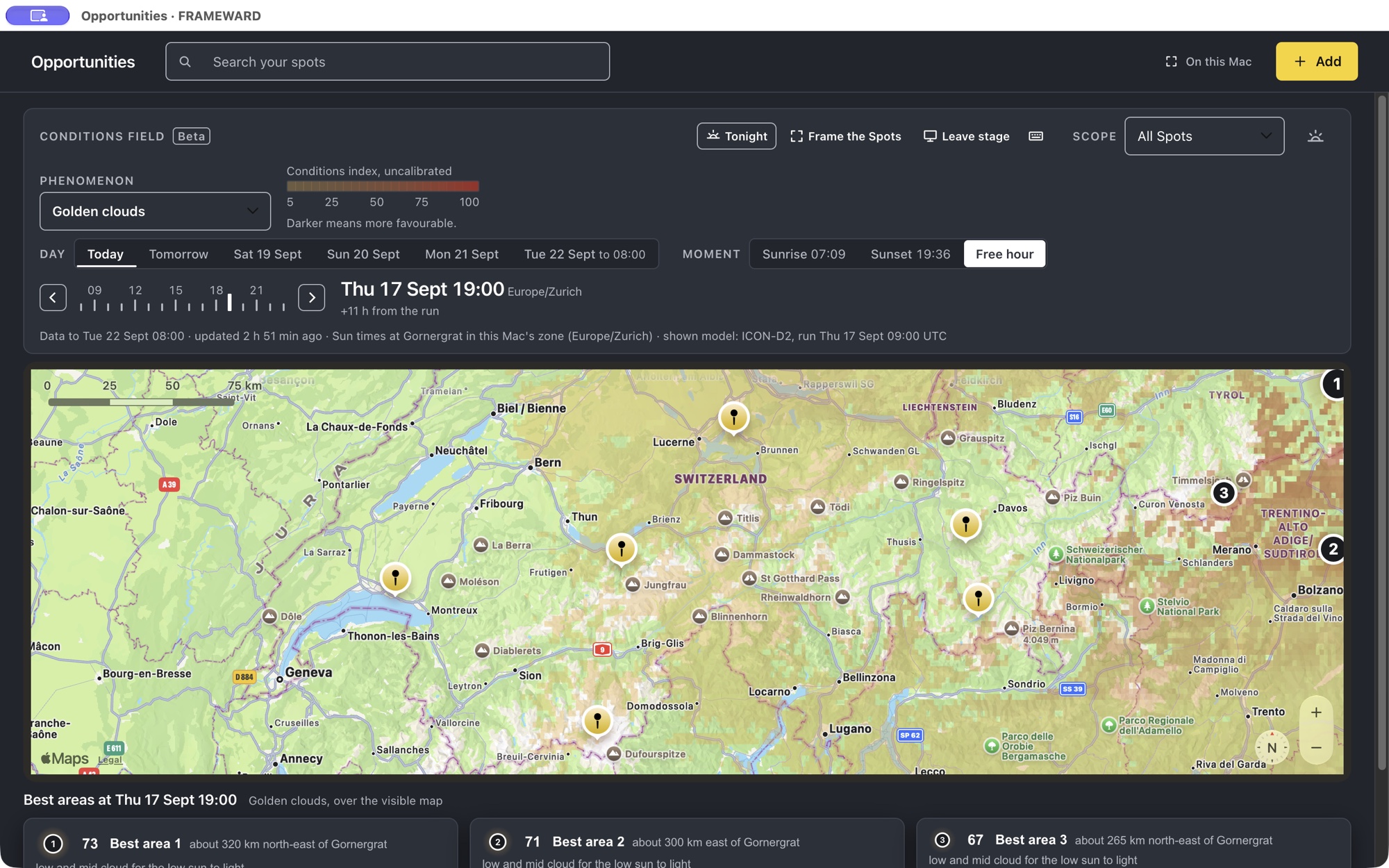
Explore cloud, fog, wind and photographic conditions over the map. Change the day or hour and compare the model’s forecast around the places you want to shoot.
Recorded in FRAMEWARD on 17 September 2026 with demonstration Spots and model forecasts. The Golden clouds layer uses amber-to-red colours for an uncalibrated conditions index: darker areas are more favourable, not a probability or cloud-cover percentage. Opportunities covers European areas within the model domain; forecasts help you plan, but do not guarantee conditions. This video is not a live forecast.
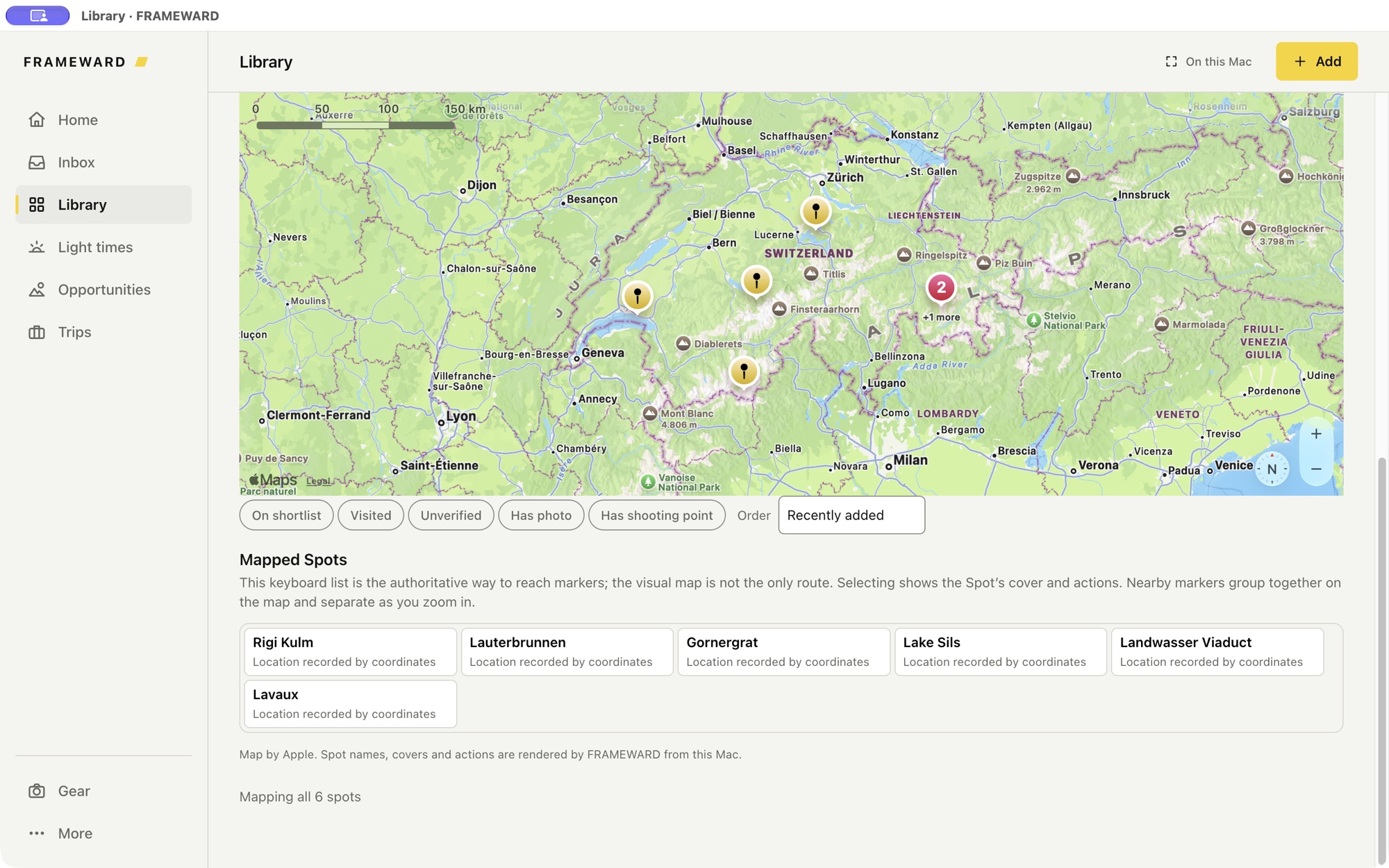
See where your saved places are, find the ones near your route and open their notes. Your imported collections and subgroups stay available alongside the map.
Check sunrise, sunset and sun direction for a saved Spot. Light times are calculated on your Mac.
Bring selected Spots into an ordered itinerary and keep your equipment and packed weight with the plan.
Use the offline overview and downloaded regions when you have no connection. Fetch new forecasts while online.
Your saved places deserve more than another file in Downloads.
Import a GPX, KML or KMZ file saved on your Mac. For a Google My Maps map, export the file first.
Check the import preview. Names, coordinates, notes, groups and supported photographs come from the source file.
Browse collections and subgroups, open a Spot, add your own notes and choose the places for your next Trip.
What imports depends on the file. Linked photos need an internet connection and access to the original image. Missing or unsupported content is reported; FRAMEWARD does not invent replacement photos or place details. Basic holds up to six Spots; larger libraries need Complete.
Follow a demonstration import, explore its collections and open a Spot.
27-second walkthrough · captions available · demonstration places and notes, without photos. The app is not yet available for public download.
FRAMEWARD is a landscape photography planning app for macOS. It keeps the whole journey in one place: the place, the moment, the plan, and the field.
Keep locations, reference photographs and notes together.
A Spot holds the place and the reasons to return: the photographs that inspired it, the notes about season, direction and access, and the coordinates you shoot from. Collections group Spots by region or by project, and a Sensitive Spot stays protected for the places you do not hand out.
On the Spot itself, not in a folder that drifts away.
Bring supported points, groups, notes and photographs into your library.
Explore light times and forecast conditions for the places you want to photograph.
Three separate things, each named for what it is. None of them promises beautiful light; they tell you what the sun and the models say, so the decision stays yours.
Blue hour, golden hour and sun bearings for the day and the place, computed on your Mac.
Current conditions, hourly and daily forecasts and available alerts for one selected Spot. Six checks a day per Mac in Basic, fifty in Complete.
Forecast ingredients from the ICON models of the German weather service, ICON-EU in cells of about 7 km and, over central Europe where available, ICON-D2 in cells of about 2 km, painted over the visible map for the coming days across European areas within the model domain. An uncalibrated interpretation, not a probability and not a safety forecast, and separate from Apple Weather.
Bring your stops, route and equipment together in a Trip.
A Trip is the Spots you chose as ordered stops along one route. Record the cameras, lenses, tripods, filters and accessories you own with their weight, assign what you will carry to the Trip and read the packed total before you leave. Trips, Gear and the packed weight are part of Basic.
One route, in the order you will drive or walk it.
The number on your back is a real one.
Take your maps and exported plan into the field.
Download the world overview once, then the regions you shoot; the map on your Mac then works with no signal and makes no map-provider request. Export the plan as GPX or KML for the device on the dashboard, or take a Field Pack offline. FRAMEWARD is a Mac app: there is no phone app, no cloud sync and no turn-by-turn navigation.
World overview and regional maps, stored on your disk.
GPX, KML and a Field Pack, plus a JSON backup of your catalogue you can leave with. Photo files are not in the backup.
Spots, photographs, notes, Trips and Gear live in a local database on your Mac. There is no FRAMEWARD account and no library sync. Apple receives the visible map area while the online map is open, Check weather sends the selected Spot's saved coordinates to Apple Weather, and the conditions field asks only for a region block and an hour. The app privacy notice explains the services the app uses.
Free
No trial and no time limit.
€9.99once
Paid once through the Mac App Store, at a euro reference price; the store shows the actual price for your country. Everything in Basic, and three more things.
Nothing renews. Planned pricing, confirmed when the Mac App Store listing opens. There is no checkout on this site: purchases, receipts, VAT and refunds are handled by Apple under its own terms.
Not yet. FRAMEWARD is in development and will be distributed through the Mac App Store. The signup on this page sends occasional development notes and one email when it ships.
If you can download it as a supported GPX, KML or KMZ file, you can import its supported contents. A Google Maps link on its own is not an import file. Photo availability and grouping depend on the export; check the preview and import report. Keep the original creator’s terms in mind when sharing or exporting their content.
FRAMEWARD Basic: up to six Spots with photos, notes, collections and Sensitive Spots; Trips, Gear and the packed weight; light times and sun direction; Apple Weather for one selected Spot; the offline world overview and regional maps; GPX, KML and Field Pack exports; catalogue backups, without photo files. No trial and no time limit.
No. FRAMEWARD Complete is a one-time purchase through the Mac App Store, at a euro reference price of €9.99; the store shows the actual price for your country. It adds unlimited Spots, the conditions field over European areas within the model domain, and fifty Apple Weather checks a day per Mac instead of six. Nothing renews.
Your library, Trips, Gear, light times, exports and downloaded map regions work offline. Apple Maps and Apple Weather need a connection; without one, FRAMEWARD falls back to the map stored on your Mac. The conditions field needs a connection. While FRAMEWARD stays open, hours and areas you have already viewed stay readable without one; the field is not kept after you quit, and a saved check keeps its reading.
Across European areas within the domain of the ICON models of the German weather service (Deutscher Wetterdienst). ICON-EU, in cells of about 7 km, reaches most of Iceland, the UK and Ireland, the Faroe Islands, Madeira, Malta, Crete and Cyprus; the Canary Islands, the Azores, Svalbard, Norway's North Cape and northern coast, the western tips of Iceland, and the Arctic islands and Polar Urals lie outside it. Over central Europe, where available, the app uses ICON-D2 in cells of about 2 km and says which model a frame shows. Forecast hours run hourly through three days and every three hours through five on ICON-EU, and hourly through two days on ICON-D2, where available. FRAMEWARD's server converts each model run into signed region files; your Mac downloads the files for the part of the map on screen and interprets them locally. Outside the model's domain the app says so and paints nothing.
Apple Weather is a forecast for one selected Spot: current conditions, hourly and daily forecasts and available alerts, in both tiers: six checks a day per Mac in Basic, fifty in Complete. The conditions field is FRAMEWARD's interpretation of a national weather model over the visible map, for photographic conditions such as afterglow, sea of fog, starry nights and fresh snow, and it comes with Complete. A reading is an uncalibrated interpretation of forecast ingredients, not a probability and not a safety forecast. The two are separate, and Apple Weather data is never used for the field.
Your library stays in a local database on your Mac. There is no FRAMEWARD account and no library sync. While the online map is open, Apple receives the visible map area. Check weather sends the selected Spot's saved shooting coordinates to Apple Weather, and a Sensitive Spot asks for one-use permission first. The conditions field requests a region block and an hour, never a Spot, a name or a coordinate; the field server sees ordinary connection data, like any web host, and keeps no account. The offline map makes no request. The app privacy notice has the details.
FRAMEWARD is a macOS app coming to the Mac App Store. The current private beta targets Apple silicon and macOS 15. Final compatibility will be confirmed in the App Store listing.
FRAMEWARD can complement PhotoPills rather than replace it. PhotoPills provides mobile tools for planning the Sun, Moon, Milky Way and other celestial conditions. FRAMEWARD focuses on a private Mac workspace for organising photography Spots, managing Gear, planning Trips and preparing for the field. The conditions field compares photographic conditions across the map from a national weather model.
FRAMEWARD is independent and is not affiliated with, sponsored by or endorsed by PhotoPills.
More detail: landscape photography planning for Mac.
Get occasional development notes and one email when FRAMEWARD launches.
Confirm your email address to join; unsubscribe anytime. Privacy notice.